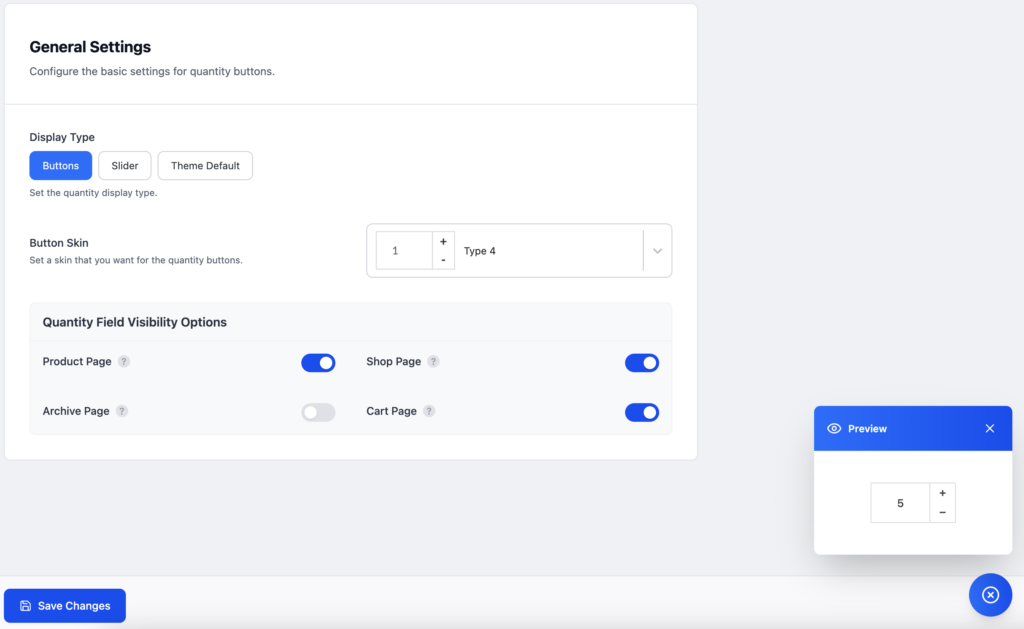
There are two different kinds of quantity input options available in this plugin. Buttons that provide plus/minus type increment and decrement quantity options are the default. And another is a range slider type quantity input.
You can choose any of those display types for the quantity input. Each of the types has its own customization options. You can see when you switch this option.
If you simply want to use our min, max, step, and default quantity options from our plugin, and your theme already has a good quantity input display option. The theme default option can then be chosen here.
There are a few different skins available for the display-type buttons. By selecting the preview icon in the lower right corner, you can select any of those and view the live preview.
Selecting the quantity field visibility option is the most crucial step in this section. Ensure that the visibility settings for the location of this quantity input display are enabled. It can be enabled for the single product page, shop page, products archive page, and cart page.